content-design
How my information architecture audit uncovered years of design debt
I led a small team to audit 800 support tickets about one of eSignature's top support request topics. The verdict? Docusign spends lots of money each month just to answer questions about experiences that should be intuitive.
Context
My employee onboarding tasks required an eSignature audit. Because eSignature is a massive, complex Enterprise product, I opted to narrow the scope to a top contact reason. From there, we exported a sample set of tickets to a spreadsheet for a ticket dive. We chose the number two contact reason, since a fix for number one was on the way.
I limited the scope of my audit based on our ticket dive data. From there, I looked through each label, term, filter, and other actions to document the information architecture of our core product offering.
We found inconsistent envelope statuses, folder names, and search filters. For example, only four of the 8+ standard folders in left hand nav include filters for envelope status. Those filters for envelope status only include 7 of over 18 envelope statuses!
Later, I used these audit results to inform critical work with two Docusign products: Notary and Forms for Real Estate.
Audit
We used Google Sheets to manage everything. First, for our ticket dive and then for the information architecture audit.
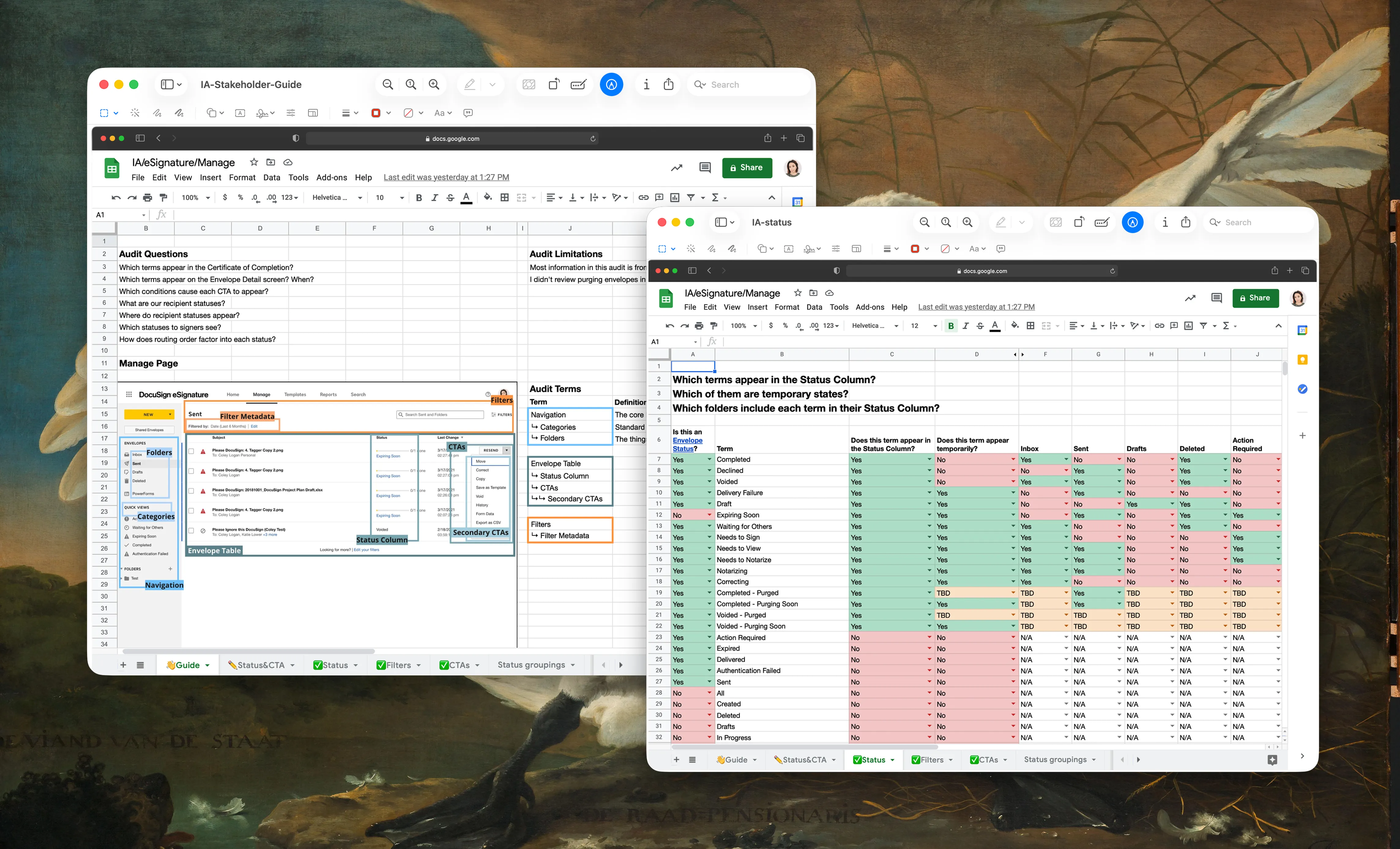
I organized my IA spreadsheet by status, filters and CTAs. The first sheet was a landing page for the project, where I kept track of questions I wanted to answer. I made a map and named different regions of the screen to make it easier to record data and observations.
I used my test account to audit statuses in eSignature. I made dozens and dozens of test envelopes to trigger each status and see when and where those statuses appeared in the UI. Then, I used the audit trail as a source of truth to confirm which terms were official envelope statuses.
Later, I made wireframes of the eSignature dashboard to 1) communicate content patterns and 2) annotate areas with conflicting and inconsistent behavior.
Impact
My audit uncovered a (fixable) mess. For instance, folders that should only feature envelopes with one specific status would show envelopes with other statuses. The inconsistent use of terminology was prevalent.
You can create all the features and all the content to drive growth, but if you don’t maintain what you’ve built, the mess piles up. This is the result of years and years of decisions that pile up in isolation to collect dust. Did I mention this was the number two contact reason?
The problem
Years of uncoordinated product decisions had created inconsistent envelope statuses, folder names, and search filters. Folks couldn't find their envelopes. My product managers needed guidance on how to integrate their features with eSignature.
The result
An audit of envelope statuses, folders, filters, and their interactions. A clear map of inconsistent organization and terminology. I built a foundation for making informed decisions with my most important stakeholders.
This audit also came in handy when I worked with the PM for Forms for Real Estate. We considered adding to the top level navigation for that eSignature-integrated product.
Design details
A few answers to questions folks may have.
How long did the audit take?
The project took about a month to complete. My colleague, Tim, and I sorted through 800 tickets manually to narrow the scope. Once we were done, I audited the information architecture.
Why 800 tickets?
This was a sample size that I felt would produce meaningful insights, based on my past experience at Airbnb.
What happened with the findings?
Did Docusign overhaul the information architecture for eSignature? It doesn't look like it, though it would've been fun to contribute to. My findings ultimately informed my familiarity with eSignature and became an essential for other projects, including Notary and Forms for Real Estate.